
Polyphonic Tuner in Guitar Pro 8
The polyphonic tuner in Guitar Pro 8 is accessible directly from the toolbar via the Tuner icon, represented by a tuning fork. It provides a convenient solution for tuning your instrument with precision.
Whether you are a guitarist, bassist, or play another string instrument, this intuitive tool allows you to check the tuning of all strings in a single strum, or fine-tune each string individually for optimal accuracy.
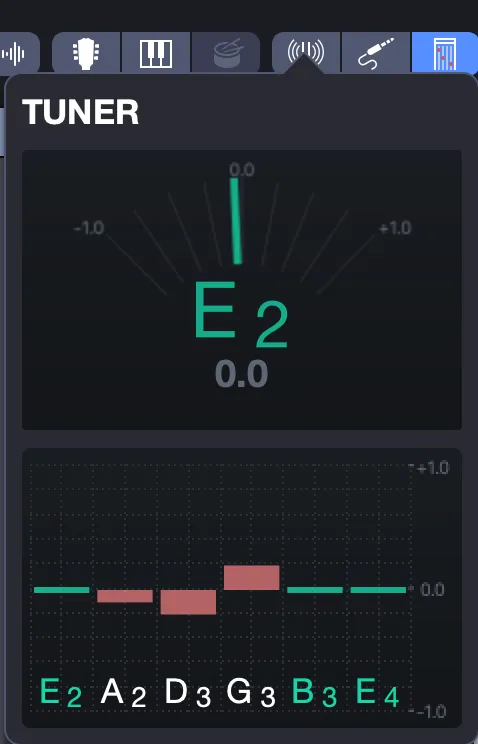
The tuner automatically adapts to the tuning defined by the active track, displaying the notes from left to right, from the lowest string to the highest, for example, E, A, D, G, B, E for a guitar in standard tuning.
Pitch deviations are indicated by red bars, measured in cents; the closer the bar is to the center, the closer the string is to the target note.
When the tuning is correct, the bar turns green.
To use the tuner, once the option is enabled, play a strum, and the polyphonic tuner, located in the lower part of the window, which analyzes all strings, applies in real time.
For more precise adjustments, play a single string: the monophonic tuner, displayed in the upper part, indicates the detected note.
You can also click on a note in the polyphonic section to isolate it in the monophonic tuner, making fine-tuning easier.
This tool ensures tuning aligned with the active track of your score.