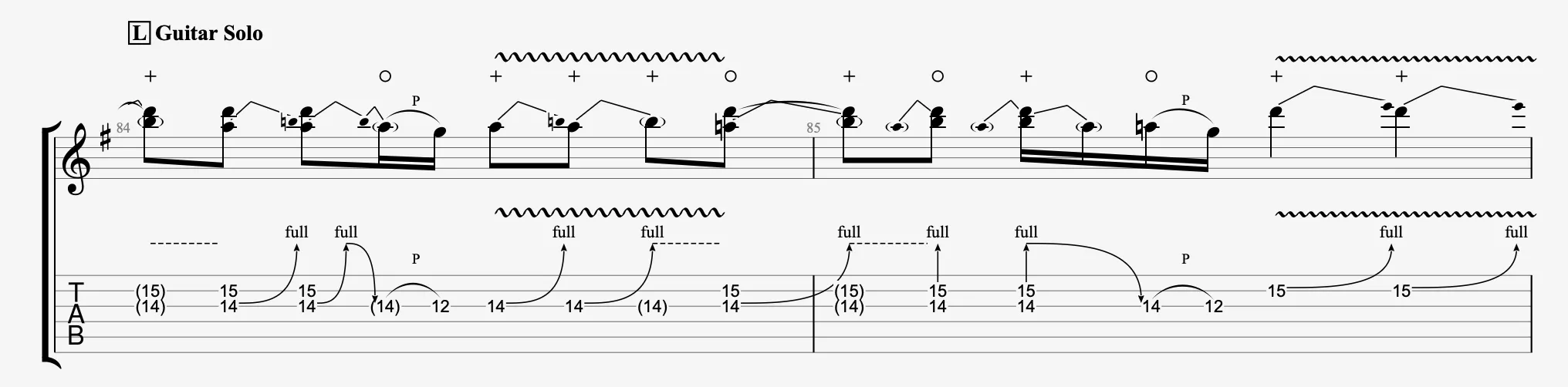
Wah-Wah Pedal in Guitar Pro 8
Wah-Wah icons in Guitar Pro allows you to visually indicate a playing intention using a Wah-Wah pedal, by specifying an open (o) or closed (+) position.
These annotations are purely visual and do not affect the sound output.
If a Wah-Wah effect is active in the RSE chain, it is applied continuously according to its settings, regardless of whether the annotations are present or not (see Track sound settings).
The icons are available in the Editing Palette:
 for the open position (o)
 for the closed position (+)
Understanding Wah-Wah
The Wah-Wah effect simulates an expression pedal that dynamically filters frequencies, between a bright open sound and a muted closed sound.
In Guitar Pro, the (o) and (+) annotations indicate the desired pedal position in the score at a specific moment.
Applying the Effect
In Guitar Pro, select a note or a group of notes, then click:
- to notate the open position (o)
- to notate the closed position (+)
These marks appear in the score and help guide the guitarist’s performance.