
MIDI in Guitar Pro 8
Definition
MIDI stands for Musical Instrument Digital Interface. It is a protocol, a universal language for communicating digital musical information between computers, synthesizers, sequencers, and more.
MIDI files contain messages that precisely describe a score: notes, rhythm, tempo, instruments, and other parameters.

The sound quality depends on your hardware (sound card, hardware or software synthesizer) rather than Guitar Pro itself, which only sends pitch and duration information to your hardware, which then converts it into audio.
Similarly, the list of instruments available in Guitar Pro is defined by the General MIDI standard and cannot be expanded unless specific hardware is used.
MIDI Output
Guitar Pro 8 supports up to four simultaneous MIDI ports. You can assign a different MIDI device to each port. It is recommended to select the best MIDI device for port 1, which is the default when creating a new track in Guitar Pro.
To enable MIDI playback for tablatures, use either the Sound > Switch All Tracks to MIDI menu or select the MIDI option for the selected track in the track inspector. The latter allows you to mix RSE (Guitar Pro’s audio engine) and MIDI tracks. You can force MIDI playback for all tracks upon opening or creating a file in Preferences, under the General tab, with the Force MIDI Playback option.
Selecting MIDI Banks (MSB and LSB)
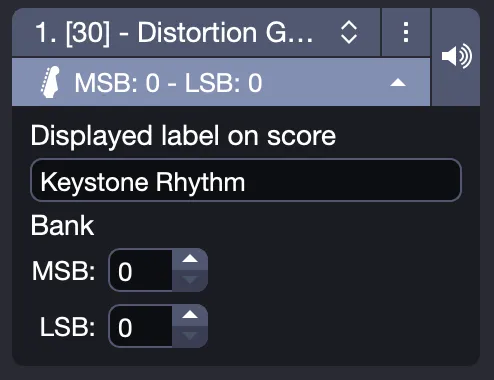
When you select MIDI mode in the track inspector, the “Bank” fields (MSB and LSB) allow you to choose a sound bank on your external MIDI device. “MSB” (0-127) defines a main category, while “LSB” (0-127) refines this selection. Then, “Program” (0-127) selects a sound within that bank.
These values vary by MIDI hardware; consult your device’s manual for specific numbers, for example, MSB=0, LSB=0 for a standard General MIDI bank.
Ports and Channels
In the track inspector, when a track is set to MIDI, you can select the port and channel(s) used.
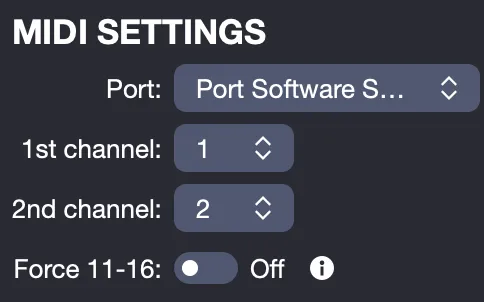
By default, Guitar Pro assigns two channels per track to enhance effect rendering, with effects played on a separate channel to avoid impacting notes without effects. If two tracks use the same channels on the same port, their audio properties (instrument, volume, pan, and others) will be linked. Using a single channel per track may be useful for scores with many tracks.
By convention, percussion tracks are always on channel 10 (MIDI standard). Enable the “force 11-16” option to have Guitar Pro use one MIDI channel per string, which is helpful when you have, for example, multiple bends occurring simultaneously.
You can adjust these settings on a per-track basis by switching the track to MIDI. Options then appear in the track inspector, allowing you to change the port and channels.
For more details: