
Exporting ASCII in Guitar Pro 8
Guitar Pro 8 allows you to export the active track as an ASCII tablature using the File > Export > ASCII menu, providing a simple way to share your scores in a universal text format.
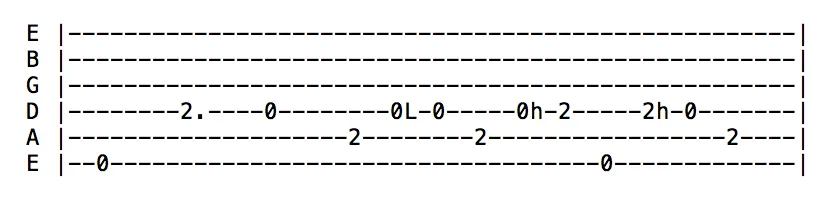
The ASCII format, a plain text file using basic letters, numbers, and symbols, is ideal for representing guitar, bass, or percussion tablatures. As a result, it is highly popular and widely used, especially in online forums, tablature websites, or for quick sharing without dedicated software.
Export Process
To export, select the active track, such as a lead guitar or bass, and navigate to the File > Export > ASCII menu. Guitar Pro generates a text file containing the tablature of the chosen track, ready to be shared or opened in a text editor. This format is particularly suitable for single tracks but does not support complex multi-track arrangements.
ASCII Symbols and Their Meaning
The table below lists the symbols used in exported ASCII tablatures, along with their musical meaning:
| Symbol | Meaning |
|---|---|
| Articulations and Dynamics | |
| L | Tied note |
| x | Muted note |
| > | Accented note |
| . | Staccato |
| Playing Techniques | |
| h | Hammer-on/pull-off |
| b | Bend |
| s | Slide |
| ~ | Vibrato |
| t | Trill |
| M | Palm mute |
| P | Popping (bass) |
| S | Slapping (bass) |
| + | Tapping |
| W | Wide vibrato |
| w | Whammy bar |
| = | Tremolo picking |
| Strums and Directions | |
| v | Upward brush |
| ^ | Downward brush |
| V | Upward pick stroke |
| n | Downward pick stroke |
| Special Effects | |
| g | Suggested note |
| < | Fade-in |