
Exporting PDF in Guitar Pro 8
Guitar Pro 8 enables you to export your scores to Adobe® PDF format, readable and printable by anyone using the free Adobe® Reader.
This vector format ensures optimal print quality, perfect for professional sharing or printing scores.
Access this option via the File > Export > PDF menu.
Export Options
The export window provides several options to customize your PDF file:
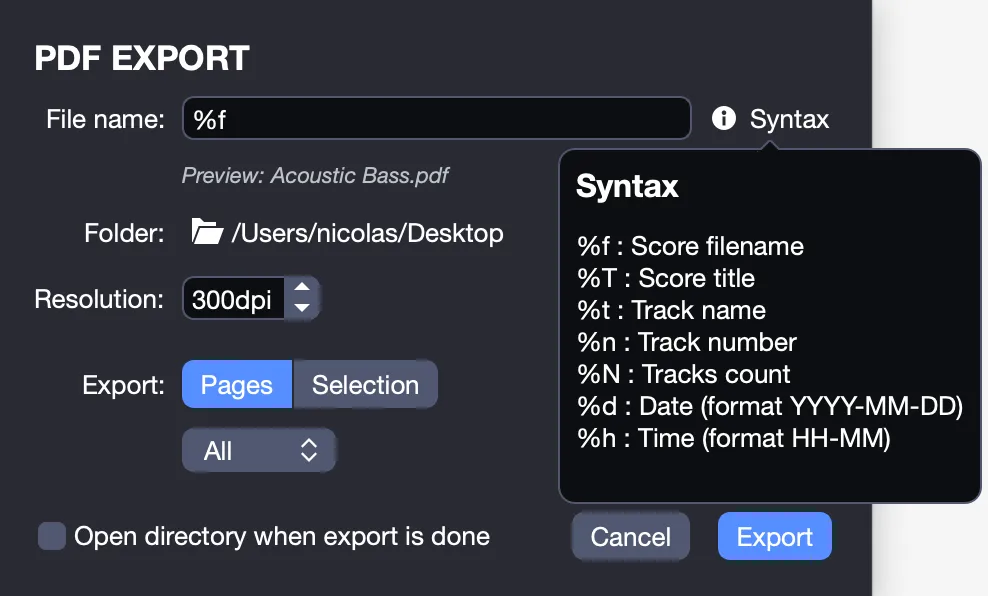
- File name: Name your PDF file.
- Destination folder: Choose where to save the file.
- Resolution: Select the resolution to balance file size and quality.
- Export scope:
- Export a specific page, a range of pages, or all pages by selecting Pages.
- Export only a selected portion of the score, pre-marked with your mouse, by selecting Selection.
- Automatic opening: Check the option to open the destination folder automatically once the export is complete, or manually retrieve the file from the chosen folder.
Once you have verified your settings, click Export to finalize the process.
Automatic Naming
Hover your mouse over the Information icon next to the File Name field to display a list of keywords for automatically naming your file. A preview of the generated file name appears below the field.
| Keyword | Name | Function | Example |
|---|---|---|---|
| %T | Score title | Name the file based on the score’s title | Anatole.pdf |
| %t | Track name | Name the file based on the current track’s name | LeadGuitar.pdf |
| %n | Track number | Name the file based on the current track’s number | 3.pdf |
| %N | Tracks count | Name the file based on the total number of tracks | 5.pdf |
| %d | Date | Name the file based on the export date | 2022-03-30.pdf |
| %h | Time | Name the file based on the export time | 13-03.pdf |