
Importing ASCII in Guitar Pro 8
Import ASCII tablatures into Guitar Pro 8 using the File > Import > ASCII menu, which converts text files into editable scores.
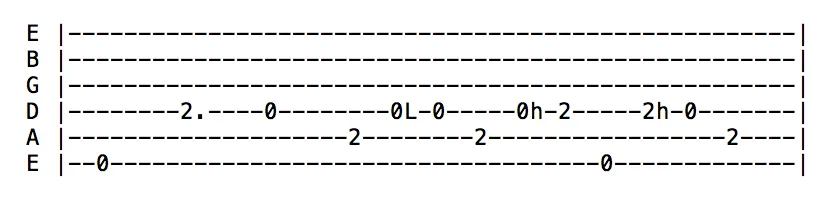
Guitar Pro can read ASCII text files and extract musical details from them. It takes plain-text tabs, such as those found online or written manually, and turns them into Guitar Pro scores with notes, rhythms, effects, and bar changes, ready for playback, editing, or printing.
The import process adds the tablature to the active track, allowing you to bring in multiple files sequentially. For example, you can import a guitar tab and a bassline onto separate tracks to create a multi-instrument score. Guitar Pro filters out extra text, such as comments, focusing only on the tablature data, even if other content is present.
Rules for a Smooth Import
For a successful import, your ASCII file should meet these basic requirements:
- Lines: Use hyphens (-) to represent each string, forming the basis of the tab.
- Bar changes: Use a vertical bar (|) across strings to separate bars.
- No gaps: Keep strings together without empty lines between them to avoid errors.
- Comments: Place any notes or text outside the tablature lines, not within them.
Following these guidelines helps Guitar Pro process the file correctly into a structured score.
Post-Import Adjustments
After importing, you may need to adjust the rhythm. ASCII files often lack precise timing, leaving bars incomplete. Use the Tools menu’s Check Bar Duration tool to identify and fix bars missing beats, ensuring smooth playback. A brief review can enhance the result.
Without these adjustments, playback might sound incorrect, notes could be cut short or skipped if they exceed the bar’s duration. Correcting this ensures accurate rhythm.