
Exporting Audio in Guitar Pro 8
Guitar Pro 8 allows you to export your scores in various audio formats, making it easy to listen to them outside the software or share them with others. Access these options through the File > Export > Audio menu.
Supported Formats
You can export your scores in the following formats:
- MP3: Compressed format, ideal for sharing.
- WAV: Uncompressed audio, perfect for maximum quality.
- OGG: Open format, compact with good quality.
- FLAC: Lossless compression, ensuring optimal sound fidelity.
- AIFF: Uncompressed format, commonly used in professional environments.
Export Options
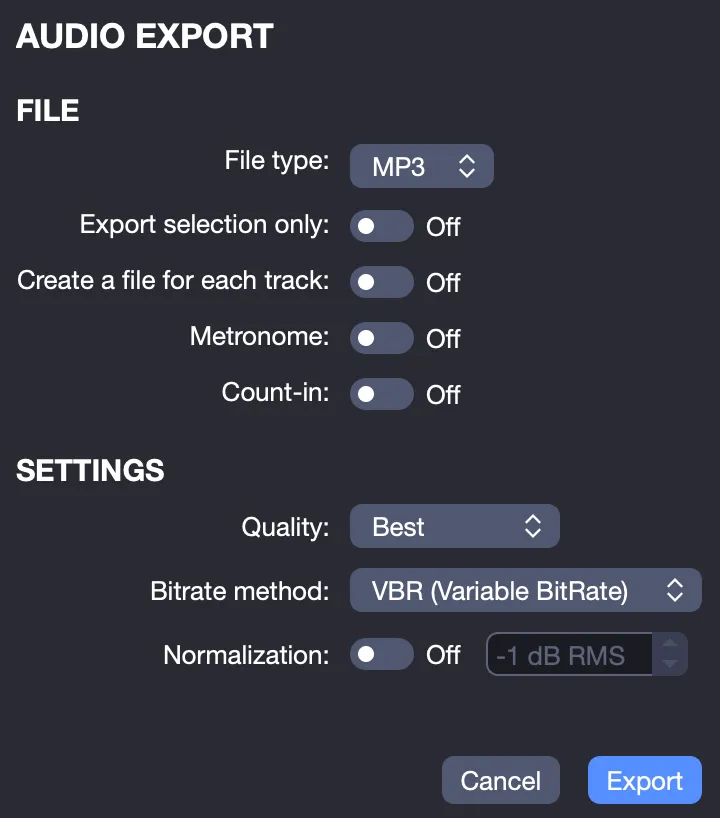
When exporting audio, Guitar Pro 8 offers several options to customize your file:
- Export a specific part: Select multiple bars, such as a verse or chorus, and check Export Selection Only to limit the export to that part.
- Export each track separately: Create a separate file for each track, ideal for later mixing in other software.
- Include or exclude elements: Choose to add or remove the metronome and count-in, depending on your needs.
MP3 Export Settings
When exporting to MP3, Guitar Pro 8 provides precise settings to tailor audio quality:
- Quality: Select the compression level, from low to high quality, to balance file size and sound fidelity.
- Bitrate mode:
- CBR (Constant Bit Rate): Fixed bitrate, ensuring predictable file size.
- VBR (Variable Bit Rate): Variable bitrate, optimizing quality based on sound complexity.
- ABR (Average Bit Rate): Average bitrate, a compromise between CBR and VBR.
- Normalization: Check this option to adjust the volume to a target level, for example, -X dB RMS, ensuring consistent audio output.
These options enable you to export your audio creations from Guitar Pro 8 with quality suited to your needs.