- Getting Started with Guitar Pro 8
-
Write a Score in Guitar Pro 8
- Fundamentals of Musical Notation in Guitar Pro 8
- Creating a Project in Guitar Pro 8: Score and Tracks
- Adding and Editing Notes in Guitar Pro 8
- Voice Management in Guitar Pro 8
- Bar Management in Guitar Pro 8
- Section Management in Guitar Pro 8
- Repeat Signs, Alternate Endings and Directions in Guitar Pro 8
- Drums and Percussion in Guitar Pro 8
- Lyrics Editing in Guitar Pro 8
- Assistants and Editing Tools in Guitar Pro 8
- Playing Effects and Musical Articulations in Guitar Pro 8
-
Playback and Audio Settings in Guitar Pro 8
- Playback and Tempo Control in Guitar Pro 8
- Audio Note Settings in Guitar Pro 8
- Mixer in Guitar Pro 8
- Track Sound Setup in Guitar Pro 8
- Automation Management in Guitar Pro 8
- Song Sound Settings (Sound Mastering) in Guitar Pro 8
- MIDI in Guitar Pro 8
- Using the Line-In Feature in Guitar Pro 8
- Using the Audio Track Feature in Guitar Pro 8
- Importing and Exporting Files in Guitar Pro 8
- Advanced Tools in Guitar Pro 8
-
Display Options and Ergonomics in Guitar Pro 8
- Show or Hide Panels in Guitar Pro 8
- Zoom Options in Guitar Pro 8
- Instrument Views in Guitar Pro 8
- Display Tablature, Standard, Rhythmic, Jianpu Notations in Guitar Pro 8
- Design Mode in Guitar Pro 8
- Page and Screen Display Modes in Guitar Pro 8
- Displaying Tracks in Guitar Pro 8
- Stylesheet Display Options in Guitar Pro 8
- Preferences and Stylesheet in Guitar Pro 8
- mySongBook in Guitar Pro 8
- Appendix
Configuring a Track via the Track Inspector in Guitar Pro 8
The Track Inspector in Guitar Pro 8 is a central tool for configuring and customizing each track in your score.
Accessible from the right side of the Guitar Pro window, it brings together several sections dedicated to managing different aspects of the track.
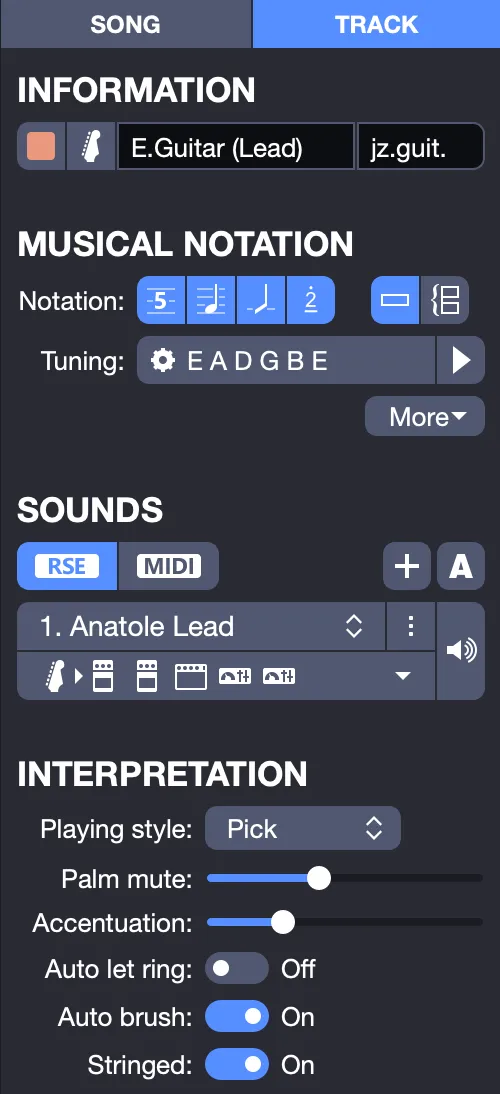
Sections Covered
- Track Information: Manages basic details, such as the track name and icon.
- Track Musical Notation: Configures the track display (standard notation, tablature, slash, or numbered notation), tuning, and transposition key.
- Track Sound Settings: Controls the sound rendering, including sound selection, sound banks, virtual pedalboard, and effect chains.
- Track Interpretation: Defines the playing style and applied effects, influencing note interpretation.