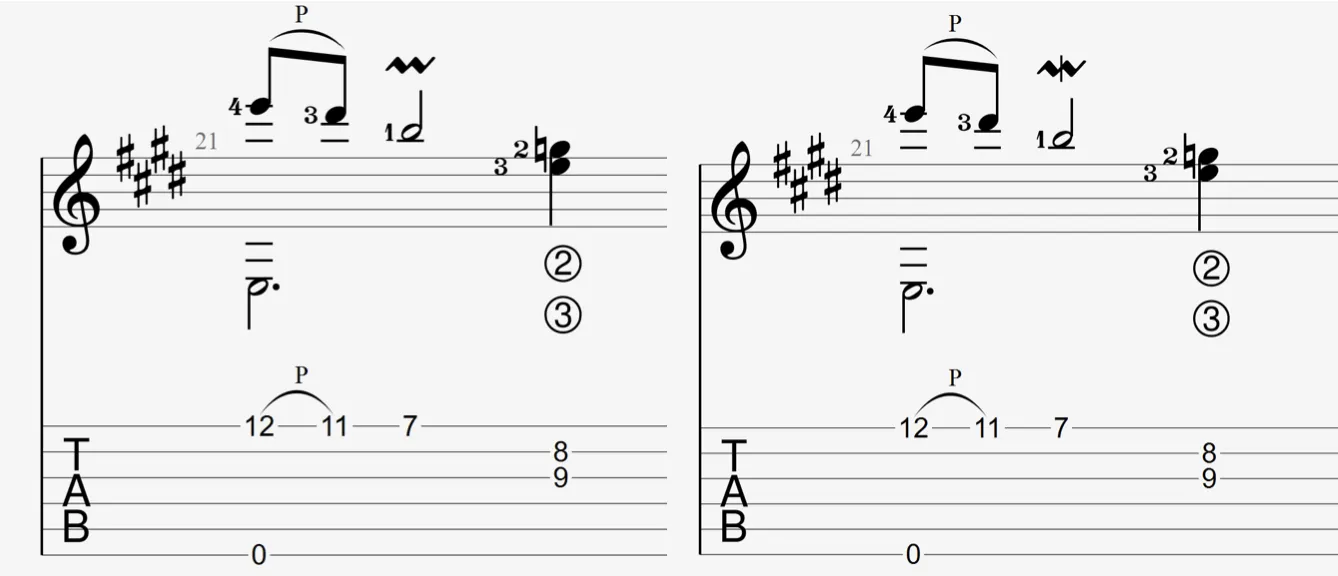
Mordents in Guitar Pro 8
Mordents in Guitar Pro create a rapid alternation between a principal note and its neighbor. They are available in the Editing Palette.
Upper Mordent
 The upper mordent creates a rapid alternation between the principal note and the note above, determined by the key signature. In Guitar Pro, this effect produces an ascending oscillation.
Lower Mordent
 The lower mordent creates a rapid alternation between the principal note and the note below, determined by the key signature. In Guitar Pro, this effect produces a descending oscillation.
Application
Mordents are inserted via the Editing Palette:
- Select a note, then click to insert an upper mordent: a rapid alternation with the note above, notated with a zigzag symbol.
- Click to insert a lower mordent: a rapid alternation with the note below, indicated with a slashed symbol.