
Notation and Design Symbols in Guitar Pro 8
The notation and score design symbols enhance the appearance and readability of your score without affecting the sound rendering.
They offer a wide range of visual tools: chords, textual annotations, section markers, barre indications, slurs, stem adjustments, etc.
Use them to clearly structure your project, guide performers, and clarify score reading.
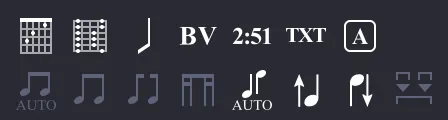
| Symbol | Name | Description |
|---|---|---|
 |
Chord | Adds a chord. |
 |
Slash | Converts notes to slash notation. |
 |
Extended Barre | Indicates whether to perform a barre, and what type. |
 |
Timer | Indicates the temporal position in the piece. |
 |
Text | Adds free text. |
 |
Section | Adds a section. |
 |
Automatic Stem Direction | Automatic stem direction for selected notes. |
 |
Inverted Stem Direction | Inverts the stem direction of selected notes. |
 |
Automatic Beaming | Automatic beaming between notes. |
 |
Force Beaming | Forces beaming between notes. |
 |
Break Beaming | Breaks beaming between notes. |
 |
Break Secondary Beaming | Breaks secondary beaming between notes. |
 |
Force Groups | Forces groups of the same tuplets. |
Chords
This button is a shortcut that allows you to open the Chords window to add a chord to the current track at the selected beat.
More information on Chord Diagrams in Guitar Pro.
Slashes
This button allows you to integrate slash notation into the tablature and standard notation for all instruments. It converts selected notes to slashes while preserving the information of the entered notes. Very useful for entering rhythms with transition notes.
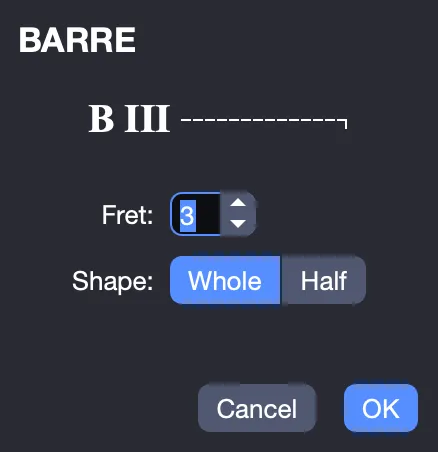
Extended Barre
Indication above the staff that specifies whether to perform a barre or semi-barre on a specific fret during a part of the score. Widely used in classical guitar when there is no tablature.
Timer
Allows you to indicate at a specific point the number of minutes and seconds elapsed since the start of the score. This calculation is performed automatically by Guitar Pro and displayed in the format min:sec on the score. For repeats and redirects, the displayed time is that of the first pass.
Section
This shortcut allows you to open the Section window to add a section starting from the selected measure.
More information on Sections in Guitar Pro.
Stem Direction
Modify the stem and beaming direction using these buttons.
Note Grouping
Beams can be modified to force some or prevent others, depending on the needs of your project.