INTERFACEINTERFACE
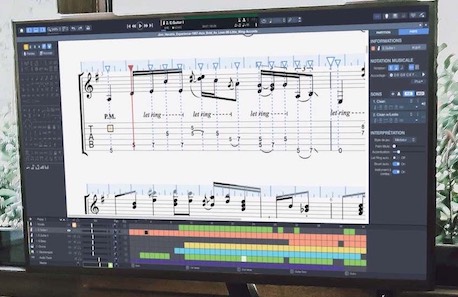
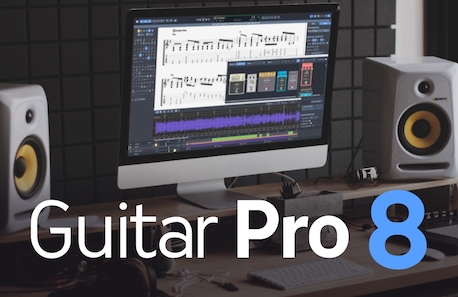
You'll know how to handle the interface in a matter of minutes, easily navigating over its tabs and buttons. For optimal ease in reading, you'll be able to display your scores as you prefer -- full-screen, double-page, or parchment-like --, and also display a guitar fretboard to visualize the exact positioning of your fingers on it.


Guitar Pro is a multilingual interface available in 19 languages on the Windows, Mac, and Linux operating systems.

The score appears with 6 retractable panels to its left:
Editing, Instrument, Audio, Mastering, Chords, and Lyrics.
The score appears with 6 retractable panels to its left:
Editing, Instrument, Audio, Mastering, Chords, and Lyrics.

INTERFACE
Choose your display options from the screen or page mode, horizontal or vertical scrolling, monotrack, multitrack, and full-screen mode, and 25-800% zooming.
INTERFACE INTERFACE INTERFACE INTERFACE INTERFACE
EDITINGEDITING
Express your talent by creating your own scores in a matter of minutes. You can edit the notes directly on the standard score or on the tablature. In either case, capture your notes quickly with the numerical pad, the mouse, or even a MIDI instrument.

Symbols and effects
Guitar Pro allows you to add to your score all of the usual musical symbols pertaining to the guitar and to other stringed instruments.

The score
The scoreCustomize your score
Based on the classic or jazz styles, you can set 70 different parameters, configure the outlook of your scores exactly as you wish, and get professional-level paper printouts.
The score
Tablature and standard notation
Both types of notation are perfectly synchronized: the notes capture into one get immediately reported into the other.


The notation elements

Summary of the notation elements
Dynamics, grace note, staccato, fade in, left-hand and right-hand fingering, brush, pick strokes, ghost note, accented notes, muffled note, let ring, harmonics, tapping, slap, hammer-on / pull-off, bend, tremolo bar, slides, vibrato, wide vibrato, trill, tremolo picking, palm mute, multirests, double dotting, n-tuplets, fermata, double accidentals, left-hand tapping, rasgueado, arpeggio, rhythmic « slash » notation, ornaments, extended barré…; and of course texts, lyrics, chord diagrams...

New
The design mode
allows you to adjust bar sizes by hand.

New
4-voice edition for more accurate writing.

AUDIOAUDIO
Guitar Pro is also a powerful score player, which facilitates composing or learning a piece.

Effects pedals and amps
The RSE: realistic audio playback
The RSE (Realistic Sound Engine) technology includes the realistic studio recordings of instruments, as well as some effect modelisations that are the result of years of research.
You'll get access to over a hundred soundbanks, and over fifty effects pedals and amps. We provide many presets for all styles, and you can also configure your own effect chains. You can apply a mastering to the final result, with a compressor-limiter, a reverb, and a 10-track equalizer.
You can also listen to your scores in MIDI sound.

Optimized playback options
During playback, the score automatically scrolls on and a highlighted cursor lets you know which note is being played. You can adjust tempo, and play all or part of a piece in loops. The Speed Trainer will then let you play any section of the score in loops with progressive accelerations. This is very useful to practice a solo or a complex guitar riff!
All of the effects specific to the guitar (e.g., bend, slide, ghost notes, etc.) are rendered into the playback, as well as the various possible playing styles – pickstroking, fingerpicking or slapping, for instance.


Choose the RSE soundbank, the tuning mode, and the playing style: slap, picking ... Select one of the built-in presets, or customize your own effect chain (stompboxes, amps, racks) for each track Global tuning of the master  (compressor, reverb, equalization)
New
Choose the RSE soundbank, the tuning mode, and the playing style: slap, picking ...
In Guitar Pro 6 the RSE2 offers over a hundred soundbanks, new integrated presets, and the possibility to entirely configure the sound of each track.
Improved Management of Automations
In a new window, you can customize precisely the changes of volume, tempo, and panoramic during playback.

The transport bar
New The transport bar synthesizes your display options.
Soundboard, global view
For each track, the Guitar Pro Soundboard lets you adjust the volume, the panoramic, and the semi-parametric equalizer.
You can also use it to mute one or several tracks, and choose to show or hide them. An ideal tool when you want to use Guitar Pro as backing band.
The global view allows you to get a synthetic view of the score, and thus to easily move around it. You can define various sections in a score, such as Intro, Verse, or Chorus.
Soundboard
TOOLSTOOLS
Guitar Pro is a true workshop for guitarists: chord and scale libraries, tuner, metronom, virtual fretboard and keyboard. All of those tools work with fretted instruments from 4 to 8 strings.

Diagram generator
Request any chord in any tuning, and Guitar pro will display all possible finger positions for you. Draw a diagram by clicking on the grid, and Guitar Pro will suggest all possible names for that chord.

Scale engine
The scale engine presents a large directory of scales, from the most common to the most exotic, for you to look at and listen to. Whichever scale you select can be shown on the fretboard or keyboard to work as support for you to write your score. The search function also allows you to quickly find out what scale is being used in all or part of the score.

MIDI and digital tunersMIDI and digital tuners
The digital tuner allows you to tune your guitar by plugging it into the soundcard, or via a microphone. You can also simply tune your guitar by ear, string by string, with the MIDI tuner.
Those work for all possible tunings.

Virtual fretboard and keyboard
The virtual fretboard and keyboard are here to help you see the notes from the score, or capture them into it. They can show you the notes of the current beat, as well as the notes of the next beat, of the whole bar or yet again of the scale you have selected. Those are indispensable tools if you are beginning or is you wish to capture notes with the mouse.


MIDI and digital tuners Tuning Virtual fretboard
SHARESHARE
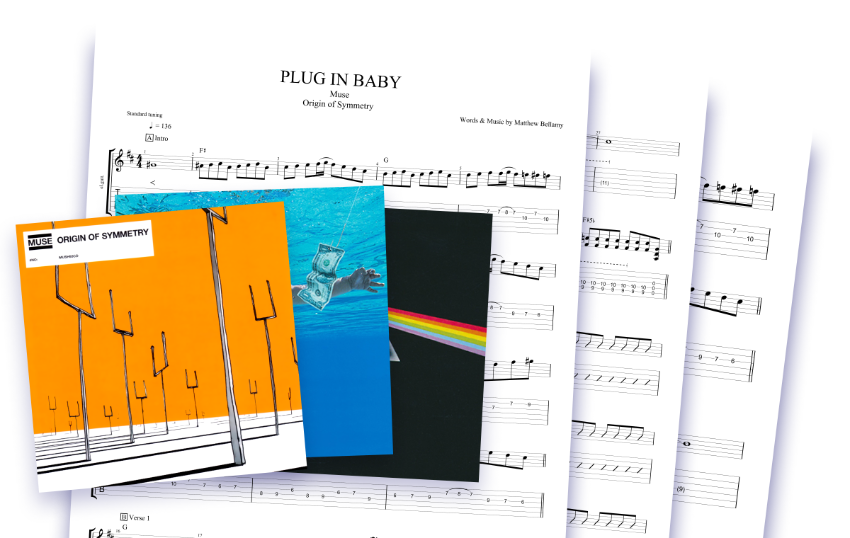
Export the songs you have created or arranged in Guitar Pro, to listen to them on your iPhone or iPad and share them with your friends. You'll have access to thousands of scores in Guitar Pro format (*.gp3, *.gp4, *.gp5, and *.gpx files) shared online by our users. You can also import or export your tunes to the MIDI format.

The score
  • MIDI Import/Export
    A MIDI file consistes in a mere description of musical data, which Guitar Pro turns into an actual multitrack tablature. The software calculates and optimizes the position of each note on the fretboard for you to play it as easily as possible. You can also export the tablature as a MIDI file for use in another software. Download the sample
  • ASCII Import/Export
    The ASCII format — or simple text file — was the first format used for the sharing of tablatures. It is so easy to use via a mere text editor that it is still widely used today, in spite of its outdated look. Guitar Pro will let you convert ASCII files into tablatures in one click, to play them or print them out. The reverse option is also possible. Download the sample
  • WAV Export
    With the WAV Export option, you can convert a Guitar Pro file into an audio file, which you can play or burn onto an audio CD. Download the sample
  • PNG Export
    Exporting into PNG (image) will let you save your tablatures as big-sized pictures. Those pictures can for instance be integrated into a webpage for wider diffusion, or edited with the appropriate software for pedagogical purposes. Download the sample
  • PDF Export
    The PDF format is standard when you wish to distribute your scores. Download the sample
> Homepage > Products > Guitar Pro 6